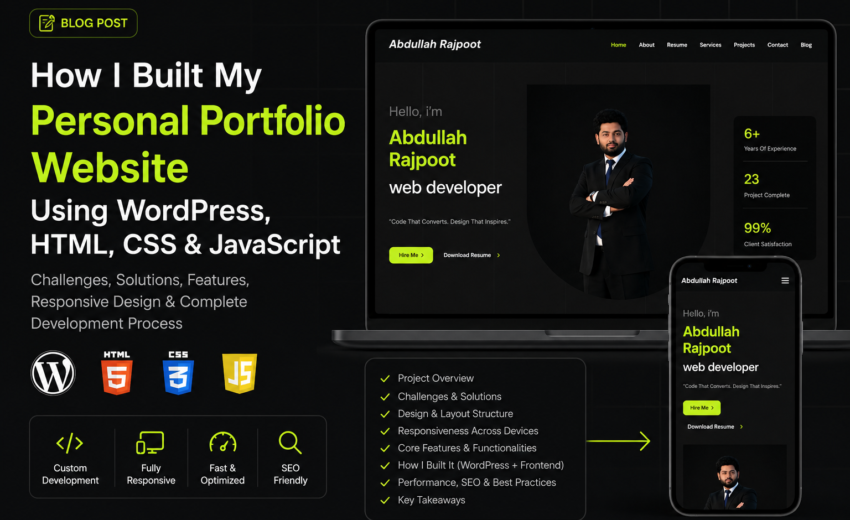
Creating a personal portfolio website was one of the most important projects in my journey as a web developer. As a Software Engineering student and a professional WordPress developer, I wanted to create a website that truly represented my skills, experience, personality, and services. My goal was not only to create an attractive design but also to build a fast, responsive, SEO-optimized, and user-friendly website that could help me grow professionally and attract clients.
In this blog, I will explain the complete development process of my personal portfolio website, including the challenges I faced, the solutions I implemented, the technologies I used, and how I created the entire project using WordPress along with frontend technologies like HTML, CSS, and JavaScript.
Why I Decided to Create a Personal Portfolio Website
As a web developer, having a portfolio website is extremely important. It acts as your digital identity and helps clients understand your skills, experience, projects, and services. I wanted a website that could:
- Showcase my web development skills
- Present my projects professionally
- Highlight my services and achievements
- Improve my online presence
- Help me attract freelance clients
- Build trust and credibility
- Create a strong personal brand
I also wanted my website to have a modern UI design with dark aesthetics, smooth animations, and a professional layout that matches current design trends.
Planning the Website Structure
Before starting development, I planned the entire structure of the website. Planning was important because it helped me organize all sections properly and create a smooth user experience.
The main sections of my portfolio website included:
- Hero Section
- About Me
- Resume Section
- Services
- Projects Portfolio
- Testimonials
- Skills
- Contact Section
- Blog Section
I carefully designed the user flow so visitors could easily navigate through the website without confusion.
Technologies Used in the Project
Although the website was built using WordPress, I also used frontend technologies to customize the design and functionality.
WordPress
WordPress was the main CMS used for the website. I selected WordPress because it provides flexibility, scalability, easy content management, and powerful customization options.
HTML
HTML was used to structure custom sections and layouts. I created clean and semantic HTML structures for better accessibility and SEO.
CSS
CSS played a major role in designing the entire website. I used custom CSS for:
- Responsive layouts
- Typography styling
- Button effects
- Grid systems
- Animations
- Section spacing
- Mobile responsiveness
- Dark theme styling
JavaScript
JavaScript was used to add interactive functionality to the website, including:
- Smooth scrolling
- Navigation interactions
- Hover effects
- Dynamic animations
- Mobile menu functionality
- Scroll-based effects
Designing the Website Layout
One of the most important parts of the project was designing the website layout. I wanted the design to look premium, modern, and professional.
The homepage was designed with a dark theme combined with neon green accent colors to create a strong visual identity. The layout focused on simplicity while still maintaining a modern and attractive appearance.
Hero Section
The hero section was designed to instantly capture attention. It included:
- Professional introduction
- My name and title
- Strong CTA buttons
- Professional image
- Statistics section
The goal was to make visitors immediately understand who I am and what services I provide.
Navigation Menu
I created a clean and responsive navigation menu with smooth scrolling effects. The navigation was optimized for both desktop and mobile devices.
Services Section
The services section highlights the solutions I offer including:
- WordPress Development
- Frontend Web Development
- SEO Optimization
- Website Customization
Each service card was designed with hover effects and modern spacing for better visual appeal.
Projects Section
The projects section was created to showcase my previous work professionally. Each project includes:
- Project image
- Project title
- Short description
- Technologies used
- CTA buttons
This section helps build trust with potential clients.
Challenges I Faced During Development
Building a professional portfolio website was not easy. I faced several technical and design-related challenges throughout the project.
1. Responsive Design Issues
One of the biggest challenges was ensuring the website looked perfect on all screen sizes.
Initially, some sections looked good on desktop but broke on mobile devices. Elements overlapped, text spacing became inconsistent, and some images were not scaling properly.
Solution
To solve this issue, I used:
- CSS media queries
- Flexible grid layouts
- Responsive units like rem and percentages
- Mobile-first design techniques
I tested the website on multiple devices and screen resolutions to ensure perfect responsiveness.
Mobile Optimization
Since most users browse websites from smartphones, mobile optimization was extremely important.
I optimized:
- Mobile navigation
- Button sizes
- Font readability
- Image responsiveness
- Section spacing
- Loading speed
This improved user experience significantly.
2. Website Speed Optimization
Another major challenge was maintaining fast loading speeds while using high-quality images and animations.
Slow websites negatively impact both SEO and user experience.
Solution
I implemented several performance optimization techniques including:
- Image compression
- Lazy loading
- Minified CSS and JavaScript
- Caching plugins
- Optimized WordPress settings
These optimizations improved website performance and loading speed.
3. SEO Optimization Challenges
I wanted the website to rank on Google and attract organic traffic. However, SEO optimization required careful planning.
Solution
I implemented:
- Proper heading structure
- SEO-friendly URLs
- Meta titles and descriptions
- Optimized images with alt text
- Internal linking
- Keyword optimization
- Fast loading speed
- Mobile responsiveness
I also focused on writing high-quality content with naturally integrated keywords.
SEO Strategy Used in the Website
SEO was one of the main priorities during development. I optimized the website using both on-page and technical SEO strategies.
Main SEO Keywords
Some targeted keywords included:
- Personal portfolio website
- WordPress portfolio website
- Web developer portfolio
- Responsive portfolio website
- SEO optimized portfolio website
- WordPress web developer
These keywords were naturally added throughout the content.
Technical SEO Improvements
I also implemented:
- Schema-friendly structure
- Optimized heading hierarchy
- XML sitemap
- Clean code structure
- Optimized Core Web Vitals
These improvements help search engines crawl and index the website more effectively.
WordPress Customization Process
Although WordPress provides themes and plugins, I wanted the website to have a unique identity.
I customized:
- Theme layouts
- Custom CSS styling
- Header and footer design
- Section animations
- Buttons and typography
- Contact forms
I also integrated plugins carefully to avoid unnecessary performance issues.
User Experience and UI Design
User experience was one of the main focuses of the project.
I ensured:
- Easy navigation
- Fast page loading
- Smooth scrolling
- Clear call-to-action buttons
- Professional typography
- Consistent design language
The combination of dark colors, clean spacing, and smooth animations created a premium user experience.
Lessons I Learned From This Project
This project helped me improve my skills in:
- WordPress development
- Frontend design
- Responsive layouts
- SEO optimization
- Website performance optimization
- UI/UX design
- Problem solving
I also learned the importance of planning before development and testing websites on multiple devices.
Final Results of the Project
After completing the project, the final website successfully achieved my goals.
The website:
- Looks professional and modern
- Works perfectly on all devices
- Loads quickly
- Is fully responsive
- Is SEO optimized
- Represents my personal brand professionally
Most importantly, it gave me confidence as a web developer and helped me showcase my skills in a professional way.
Conclusion
Creating my personal portfolio website was an exciting and valuable experience. From designing the layout to solving responsiveness issues and optimizing the website for SEO, every step helped me grow as a developer.
Using WordPress along with HTML, CSS, and JavaScript allowed me to create a fully customized and high-performing website that reflects my professional identity.
This project was not just about building a website — it was about creating a digital brand that represents my journey, skills, creativity, and passion for web development. If you are planning to build your own portfolio website, focus on user experience, responsive design, SEO optimization, and clean development practices. A strong portfolio website can open countless opportunities and help you stand out in the competitive digital world
Click here to visit the WEBSITE

May 12, 2026