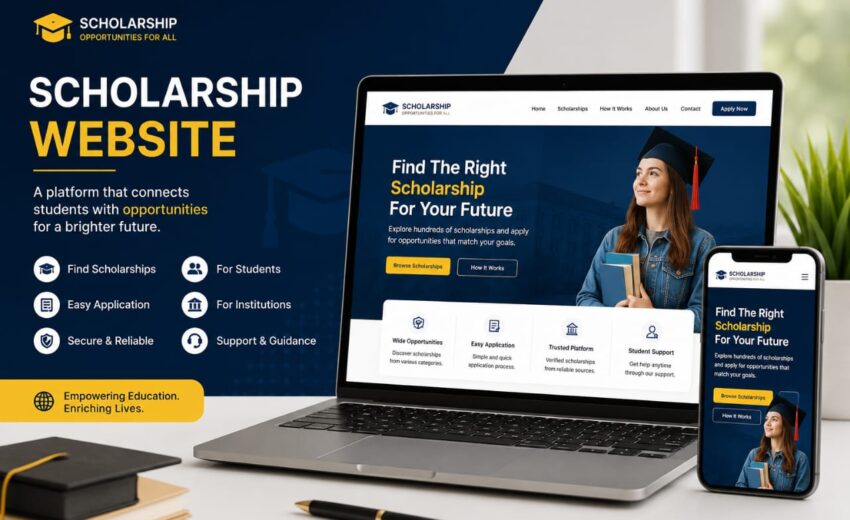
Building a scholarship website was one of the most meaningful projects I have worked on as a web developer. The main goal of this project was to create a platform that helps students easily find scholarships, educational opportunities, admission updates, and study-related information in one place.
As a Software Engineering student and professional WordPress developer, I wanted the website to be modern, responsive, fast, SEO-friendly, and easy to use for students from different backgrounds. Since scholarship websites usually contain a large amount of information, one of my biggest priorities was creating a clean structure and excellent user experience.
In this blog, I will explain the complete development process of the scholarship website, including the technologies I used, the challenges I faced, the solutions I implemented, and how I optimized the website for performance and SEO.
Why I Decided to Create a Scholarship Website
Education is one of the most important parts of every student’s life, but many students struggle to find authentic scholarship opportunities online. Most websites are cluttered with advertisements, outdated content, or confusing navigation.
I wanted to create a scholarship website that:
- Provides authentic scholarship information
- Helps students navigate opportunities easily
- Has a clean and professional design
- Works smoothly on all devices
- Loads quickly
- Ranks well on Google
- Delivers a great user experience
The project was designed to solve real problems faced by students while also showcasing my web development and WordPress skills.
Planning the Website Structure
Before starting development, I carefully planned the website structure to make the content easy to organize and access.
The website included multiple sections and categories such as:
- Scholarships
- Admissions
- Internships
- Study Abroad Opportunities
- Latest Education News
- Blog Articles
- Contact Section
- About Page
Since scholarship websites usually contain large amounts of content, proper organization was extremely important.
I focused heavily on creating a user-friendly navigation system so students could quickly find the information they needed.
Technologies Used in the Project
The scholarship website was mainly built using WordPress, but I also used frontend technologies to customize the design and functionality.
WordPress
WordPress was used as the core CMS because it allows efficient content management and scalability. It made it easier to publish scholarship posts regularly while keeping the website manageable.
HTML
HTML was used to structure custom layouts and content sections. I ensured the code remained semantic and SEO-friendly.
CSS
CSS played a huge role in designing the website interface. I used custom CSS for:
- Responsive design
- Typography styling
- Cards and layouts
- Hover effects
- Category sections
- Mobile optimization
- Color schemes
- Buttons and spacing
JavaScript
JavaScript was used to create interactive features including:
- Dynamic navigation
- Smooth scrolling
- Interactive buttons
- Mobile menu functionality
- Search interactions
- Loading animations
Designing the Scholarship Website Layout
The layout design was one of the most important parts of the project because educational websites need to be clean, organized, and easy to navigate.
I focused on creating a professional and modern interface that gives students a comfortable browsing experience.
Homepage Design
The homepage was designed to immediately show users the latest scholarships and trending opportunities.
The homepage included:
- Hero section
- Featured scholarship cards
- Categories section
- Latest posts
- Search functionality
- Call-to-action sections
The design focused on simplicity while maintaining a professional appearance.
Scholarship Cards
One of the best parts of the website was the scholarship card system.
Each scholarship card included:
- Scholarship title
- Deadline information
- Country details
- Short description
- Apply button
This structure helped students quickly understand important details without opening every article.
Navigation System
I created a clean and responsive navigation menu so users could easily browse categories.
The menu was optimized for:
- Desktop devices
- Tablets
- Mobile phones
Smooth navigation greatly improved the user experience.
Challenges I Faced During Development
Like every professional project, building the scholarship website came with multiple challenges.
1. Organizing Large Amounts of Content
Scholarship websites contain a huge amount of information, and managing content efficiently was difficult.
Initially, categories became cluttered, and some content sections looked overloaded.
Solution
To solve this issue, I:
- Created structured categories
- Used proper content hierarchy
- Designed clean post layouts
- Added search functionality
- Used filtering systems
This improved the overall organization and user experience significantly.
2. Responsive Design Challenges
Ensuring the website worked perfectly on all devices was another major challenge.
Some sections initially broke on smaller screens, especially scholarship cards and navigation menus.
Solution
I implemented:
- CSS media queries
- Responsive grids
- Flexible containers
- Mobile-first design techniques
- Optimized spacing and typography
After multiple tests across different devices, the website became fully responsive.
3. Website Speed Optimization
Since the website contains many posts, images, and categories, maintaining fast loading speed was extremely important.
A slow educational website can negatively affect user experience and SEO rankings.
Solution
I optimized performance by:
- Compressing images
- Using caching plugins
- Minifying CSS and JavaScript
- Optimizing WordPress settings
- Implementing lazy loading
These improvements helped the website load faster and perform better.
SEO Optimization Strategy
One of the main goals of this project was ranking scholarship content on Google.
I focused heavily on both on-page SEO and technical SEO.
Main SEO Keywords
Some targeted keywords included:
- Scholarship website
- Study abroad scholarships
- Fully funded scholarships
- International scholarships
- Student opportunities
- Educational website
- WordPress scholarship website
These keywords were naturally integrated throughout the content.
On-Page SEO Improvements
I optimized:
- Heading structures
- Meta titles
- Meta descriptions
- Image alt texts
- Internal linking
- URL structures
- Keyword placement
- Readability
This helped improve search engine visibility.
Technical SEO Enhancements
I also implemented:
- XML sitemap
- Mobile optimization
- Fast loading speed
- SEO-friendly structure
- Clean code practices
- Schema-friendly layouts
These improvements helped search engines crawl and index the website more efficiently.
User Experience and Interface Design
A scholarship website should be simple and comfortable to use because students visit the platform to quickly find opportunities.
I focused on:
- Clean layouts
- Easy readability
- Organized sections
- Fast navigation
- Mobile responsiveness
- Clear call-to-action buttons
The final interface became both professional and user-friendly.
WordPress Customization Process
Although WordPress provides many themes and plugins, I wanted the scholarship website to have a custom and unique appearance.
I customized:
- Homepage sections
- Scholarship cards
- Typography
- Color schemes
- Buttons and animations
- Header and footer
- Blog layouts
I also carefully selected lightweight plugins to avoid performance issues.
Security and Maintenance
Since scholarship websites are updated regularly, security and maintenance were important parts of the project.
I implemented:
- Backup systems
- Security plugins
- Spam protection
- Performance monitoring
- Regular updates
This helped maintain website stability and security.
Lessons I Learned From This Project
This project helped me improve my skills in:
- WordPress development
- Educational website design
- SEO optimization
- Content structuring
- Responsive web design
- Performance optimization
- UI/UX design
- Problem solving
It also taught me the importance of building websites with users in mind.
Final Results of the Project
After completing the project, the scholarship website achieved all major goals.
The website:
- Looks professional and modern
- Is fully responsive
- Loads quickly
- Is SEO optimized
- Organizes content effectively
- Provides excellent user experience
Most importantly, it became a useful platform for students searching for educational opportunities.
Conclusion
Creating this scholarship website was an exciting and rewarding experience. From planning the structure to optimizing performance and solving responsiveness issues, every stage helped me grow as a developer.
Using WordPress along with HTML, CSS, and JavaScript allowed me to create a fully customized, responsive, and SEO-friendly educational platform.
This project was more than just building a website — it was about creating a platform that could genuinely help students access opportunities more easily. If you are planning to build an educational or scholarship website, focus on user experience, content organization, SEO optimization, and mobile responsiveness. These factors play a huge role in building a successful and impactful website
Click here to visit the WEBSITE
May 12, 2026
How I Built My Personal Portfolio Website in...
May 12, 2026